Showing posts with label blog ads. Show all posts

Tuesday, June 2, 2009

What is Widgetbucks and Does It Work?

WidgetBucks heralds itself as the ultimate Google AdSense alternative. The system inserts "dynamic ads that cycle through a handful of products in real-time, while displaying those products star ratings, descriptions and best prices."

I am not currently using Wedgetbucks on any of my blogs or websites, but it seemed worth investigating. Widgetbucks created a stir around the webmaster community with its aggressive, anti-AdSense advertising campaign, and promise of high click payoffs. But does it work?

With WidgetBucks, your income structure is based on pay-per-click, where you are paid for each click made on an ad by a legitimate website visitor. You do not earn anything for conversions, or products sold as a result of those clicks. The main thing about Widgetbucks ads is that they dynamically cycle through a list of products that you select, rather than showing a static ad that only changes with a page refresh. Widgetbucks ad code uses Javascript to generate its Adobe Flash-based ads.

Widgetbucks is a legitimate company, and is managed by the Mpire Corporation. "WidgetBucks is created by Mpire Corporation...Founded in 2005, Mpire is backed by Ignition Partners and former eBay executive and Pay Pal angel investor Richard Rock."

Widgetbucks officially launched on October 2, 2007. The first-ever round of payments have successfully been reported by Widgetbucks publishers during the first week of December 2007. The average waiting period for the first payment was approximately 45 days.

Adsense ads and Widgetbucks ads can coexist on the same page, so you are welcome to use both on your blog.

So is it worth using? Here is Squidoo has to say about that:

"Widgetbucks is a great alternative publishers' program for anyone looking to jazz up their blog or site with a graphical, ever-changing ad that displays multiple products. Note that it is not for those looking to blend ads with the rest of their site - these ads do scream "I'm an ad!", so - other tactics should be assessed for your website(s). Widgetbucks is a good alternative for AdSense users suffering from penny clicks. Even at the minimum, I was earning $0.07 per click for a video site that was previously earning penny clicks with AdSense. Widgetbucks' contextual option struggles, for the most part (it's the option that looks at your page, and displays items that it thinks would be most relevant). Selecting your own categories is highly recommended. Note that some Widgetbucks users complain about how Widgetbucks ads will slow down the load time of a web page. This matter was addressed by Widgetbucks in late October, with more optimized ads. Many webmasters have reported more success with using Widgetbucks ads near the bottom of a page (since the ad will be loaded by the time you scroll down to see it). It should also be noted that Widgetbucks works best on websites or blogs that review products - such as consumer electronics."

Wednesday, May 27, 2009

Know What Pages Your Readers Are Viewing


If you have signed up for Google Adsense or have sold advertising space on your blog, then the next step is to find out what pages your readers are viewing. You can do this in Adsense by enabling Channels, but there are other ways, too. My favorite is some free software called FEEDJIT. There is a premium version that costs money, but the free version is quite sufficient. By customizing, copying, and pasting a few lines of HTML code into your blog's sidebar, you can have a widget that calculates your most popular posts/pages each day, records what post each visitor looks at, what search engines are finding your blog, and what websites are referring traffic to your blog and where visitors go when they leave your blog. You can also see the locations of visitors as pinpoints on a world map. And, as if that isn't enough, FEEDJIT can increase your blog traffic by promoting popular posts. Information like this can help you decide where and how to display ads on your blog, how much to charge for ad space, and more. Knowledge is power.
IMPORTANT NOTE: Just remember to use the "options" link in the widget to tell it to ignore your visits! Unless, that is, you want it to record your every visit!
Good Luck!
--Mia

Sunday, May 24, 2009

Where Should I Place Google Ads On My Blog?


One of my readers recently posed this very good question. After all, ad space in general is limited, but in a blog it's even more so. As a result, every millimeter counts. Don't waste space on ads where nobody will notice them. Obviously, your content needs to have first priority, or there is no reason for people to visit your blog. So, if you only have space for one or two ads on a blog, where should it/they go? Below is the answer from Google Adsense Help Forum. I have also posted previously on making optimal use of Adsense in blogs. I hope this all helps! --Mia

The best location for Google ads varies from page to page, depending on content. Here are a few questions to ask yourself when considering where to position your ads:
  • What is the user trying to accomplish by visiting my site?
  • What do they do when viewing a particular page?
  • Where is their attention likely to be focused?
  • How can I integrate ads into this area without getting in the users' way?
  • How can I keep the page looking clean, uncluttered and inviting?
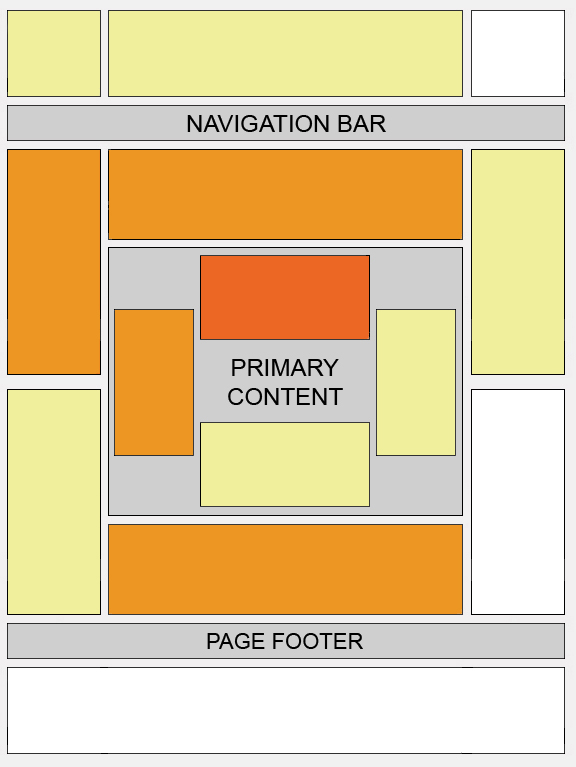
Certain locations tend to be more successful than others. This "heat map" illustrates the ideal placing on a sample page layout. The colors fade from dark orange (strongest performance) to light yellow (weakest performance). All other things being equal, ads located above the fold tend to perform better than those below the fold. Ads placed near rich content and navigational aids usually do well because users are focused on those areas of a page.

While this heat map is useful as a positioning guideline, we strongly recommend putting your users first when deciding on ad location. Think about their behavior on different pages, and what will be most useful and visible to them. You'll find that the most optimal ad position isn't always what you expect on certain pages.

For example, on pages where users are typically focused on reading an article, ads placed directly below the end of the editorial content tend to perform very well. It's almost as if users finish reading and ask themselves, "What can I do next?" Precisely targeted ads can answer that question for them.

Thursday, May 14, 2009

Ad Formats Best For Blogs

From the Google Adsense Team:

As a rule of thumb, wider ad formats tend to outperform their taller counterparts, due to their reader-friendly format. Readers absorb information in thought units (that is, several words at a time). The wider format lets them comfortably read more text at a glance without having to skip a line and return to the left margin every few words as they would be forced to do with a narrower ad. The wider ad format also lessens the likelihood of readers leaving the ad unit altogether.

If positioned well, these ad formats can increase your earnings significantly. The formats we've found to be the most effective are the 336x280 Large Rectangle, the 300x250 Medium Rectangle, and the 160x600 Wide Skyscraper. Keep in mind that while these ad formats typically perform well, you should use the format that best complements your pages.

Tip for making the most of a little ad space: Try one of our streamlined link unit formats, shown below. These formats are lean, mean, and versatile enough to fit in locations normal ads don't.